My Reports - Report Format 2
Use the My Reports service to:
- Search for a specific report.
- Review information in a report.
- Print a report.
- Export or save a report to a local or network drive in any of the following formats:
- Adobe® Accessible Portable Document Format (PDF)
- Adobe® Portable Document Format (PDF)
- Comma-separated values (CSV)
- Microsoft® Excel® (XLSX)
- Microsoft® PowerPoint® (PPT)
- Microsoft® Word® (DOCX)
- Web Archive (MHTML)
- Extensible Markup Language (XML)
IMPORTANT
DaaS is in the process of migrating all reports to this new report format. The migration is occurring over the next several product releases. All of the Ceridian Payroll Standard Reports and Powerpay Standard Reports have migrated to the new format. Also, several of the Client Custom reports have migrated to the new format. In addition, the following predefined Starter reports have migrated to the new format:
-
Blank Starter report
-
Cheque Detail Starter report
-
Earning Code Starter report
-
Employee Register Details by Code Starter report
-
Employee Starter report
-
Payroll Deduction Starter report
The information in this topic is for all reports that have migrated to the new report format. For online Help for the reports that have not migrated yet, see My Reports - Report Format 1.
 Report features
| Feature | Description | ||||||||||||||||||
|---|---|---|---|---|---|---|---|---|---|---|---|---|---|---|---|---|---|---|---|
| Report Parameters | Use report parameters to search for and include specific information in a report. For a list of report parameters for each report, see Standard Report Parameters.
When you generate a report, for faster results:
|
||||||||||||||||||
| Excel Tabs | Use this feature to export report information to different tabs in an Excel workbook. For example, if To use this report feature, in the Excel Tabs field, select Yes. |
||||||||||||||||||
| Report tool bar |
The Report tool bar is located at the top of each report.
|
 .
.  .
. .
. .Ceridian Payroll Standard reports
The following table describes the predefined Ceridian Payroll Standard reports that are currently available:
| Name | Description | ||||||||||
|---|---|---|---|---|---|---|---|---|---|---|---|
| Anniversary | Contains the names of employees with a 1 month, 1 year, 3 year, or 5 year anniversary based on months of service.
Calculating anniversaries DaaS uses the following information to determine the employees with anniversaries:
|
||||||||||
|
|
Contains the |
||||||||||
|
|
Contains the |
||||||||||
|
Deduction Detail Employee Crosstab |
Contains employee |
||||||||||
|
Deduction Detail Employee Data File |
Contains employee |
||||||||||
| Deduction Summary | Contains the total |
||||||||||
|
Earning Code Employee Detail |
Contains employee detailed hours and earning information during the specified date range by pay group and earning code. |
||||||||||
|
Earning Code Employee Detail Crosstab |
Contains employee detailed hours and earning information during the specified date range by pay group and earning code. | ||||||||||
|
Earning Code Employee Detail Crosstab Amount |
Contains employee detailed earning information during the specified date range by pay group and earning code. | ||||||||||
|
Earning Code Employee Detail Crosstab Hours |
Contains employee detailed hours information during the specified date range by pay group and earning code. | ||||||||||
| Earning Code Employee Detail Data File | Contains employee detailed hours and earning information during the specified date range by pay group and earning code. | ||||||||||
| Earning Code Summary | Contains the dashboard for hours and earning information during the specified date range by pay group and earning code. | ||||||||||
| Employee Address | Contains employee addresses organized by pay group and department. | ||||||||||
| Employee Pay Period Register | Contains detailed employee payroll information by pay group and department for one or more specified pay periods. | ||||||||||
|
Employee Pay Period Register Totals |
Contains summary employee payroll information by pay group and department for the specified pay periods. | ||||||||||
| Employee Register Details by Code | Contains the employee payroll register information for selected codes by selected pay periods. | ||||||||||
| New Hire Report | Contains the employees with a hire date during the specified date range by pay group and department. | ||||||||||
| Paid Terminated | Contains the terminated employees who received |
Powerpay Standard reports
The following table describes the predefined Powerpay Standard reports that are currently available:
| Name | Description |
|---|---|
| Deduction and Contribution - 3rd Party Benefits | Contains detailed information for the 3rd Party Benefits that Ceridian has created for a payroll. For each code, the report displays information in the following sections:
|
| Deduction and Contribution - Basic Setups | Contains detailed basic setup information for the Deduction and Contribution Codes that Ceridian has created for a payroll. For each code, the report displays information in the following sections:
|
| Deduction and Contribution - Group Retirement Plans | Contains detailed information for the Group Retirement Plans that Ceridian has created for a payroll.
For each code, the report displays information in the following sections:
|
| Deduction and Contribution - Percentage of Another Deduction | Contains detailed summary information for the Deduction and Contribution Codes that Ceridian has created for a payroll.
For each code, the report displays information in the following sections:
|
| Deduction and Contribution - Special Selections | Contains detailed information for Alberta Garnishee, Quebec Tips, and Net Pay deductions and contributions by pay group.
For each code, the report displays information in the following sections:
|
| Deduction and Contribution - Summary | Contains summary information for the deductions and contributions associated with each pay group and code. |
| Direct Deposit | Contains the deposit records for the open pay period for all active employees for the selected pay group.
This information includes the employee's:
Warning: After a payroll is submitted in Powerpay Plus, this report won't contain data until a new pay period is opened. |
| Earning Code | Contains detailed earning code information by earning code for each pay group.
This report displays information in the following sections:
|
| Employee Deductions and Contributions | Contains permanent deduction and contribution information for employees by pay group. This document contains information for employees who are active, on leave, and terminated in the current payroll year. Terminated employees from prior payroll years are excluded.
This report includes the following information:
|
| Employee Payroll Register Preview | Contains detailed payroll preview information from the Powerpay Plus preview for the current pay period for the selected pay group and entry type. This document includes information for employees who are active, who went on leave, or who were terminated during the current pay period.
This report includes the following information:
Note: The Payroll Register Preview uses your language preference to display the labels on this document, but uses the selected pay group's language preference for the data. Warning: After a payroll is submitted in Powerpay Plus, this report continues to display data. After Powerpay Plus processes your payroll, a nightly job clears the data from the Payroll Register Preview. This report won't contain data until you submit the next Payroll Preview process. |
| Employee Profile | Contains detailed profile information for employees by pay group. This document contains information for employees who are active, on leave, and terminated in the current payroll year. Terminated employees from prior payroll years are excluded.
This report displays information in the following section:
|
| Government Numbers | Contains detailed government remittance and filing information by pay group.
This report displays the following information for each pay group:
|
| New Hire | Contains the employees with a hire date during the specified date range by pay group. This document includes information for employees who are active, on leave, or terminated during the current payroll year.
Tip: Use the calendar to select the date range or enter it using the mm/dd/yyyy format. This report displays the following information for each employee:
|
| Permanent Earnings | Contains detailed permanent earnings information for employees by pay group. This report contains information for employees who are active, on leave, and terminated within the current payroll year. Terminated employees from prior pay years are excluded.
This report displays the following information for each employee:
|
| Regular Payment Employee Timesheet | Contains the employee timesheets for the open pay period for the selected pay group. This report contains information for employees who are active or who went on leave or were terminated during the current pay period. All other employees and employees who don't have time or dollar records won't appear on this report.
This report displays detailed timesheet information in the following sections:
Warning: After a payroll is submitted in Powerpay Plus, this report won't contain data until a new pay period is opened. |
To change the display of information
- To sort the reports that appear on the My Reports page, click the sort indicator (
 ) in a column heading. Each time you click the column heading, the sort order reverses.
 - To see additional results, on the bottom of the page, click one of the following:
- Previous
- Next
- A page number (if applicable).
Note: You can select to display reports in groups of 10, 25, 50, or 100. By default, reports appear in groups of 10.
To search for information on this page
To search for specific information on the My Reports page, enter one or more characters in the Search field at the top of the page. DaaS displays all reports that contain your search criteria in the report name or in the report description. For example, if you enter Deduction, all reports with a report name or report description that contains the word Deduction appear.
To access and open reports
You can access and open reports from three different locations in DaaS.
Accessing reports from the Home page
The Home page provides two hyperlinks that you can use to access reports:
- My Reports
- Recent Reports
| On the Home page, click ... | Then ... | To access a report ... |
|---|---|---|

|
The My Reports service opens and displays folders that contain reports separated by category that are available to the client. |
|
|
|
A list of up to ten reports that you most recently accessed appears. For each report, the list includes:
|
Click the Link icon ( ) associated with the report you want to open. ) associated with the report you want to open. |

Accessing reports from the Navigation panel
The navigation area, located in the upper left corner of any page, contains the navigation panel icon ( ).
).
When you click the navigation panel icon, DaaS
To search for and review a report, do this:
- On any page, in the navigation area, click
 .
. -
On the navigation panel that appears, click Reports > My Reports.
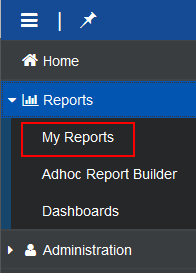
The My Reports service opens and displays folders that contain reports separated by category available to the client.
- Click the folder for the category of reports you want to access.
- When the folder expands, click the subfolder that contains the reports you want to access.
DaaS displays a list of all reports in the selected category in the right pane of the page.
- Click the report name or description of the report that you want to open.
Accessing reports using the Global Search icon
Located in the upper right corner of any page, the tool bar contains the Global Search icon ( ).
).
The Global Search icon ( ) allows you to search for one or more specific reports.
To search for and review a report, do this:
- On any page, on the tool bar, click
 .
. -
The Search field appears:
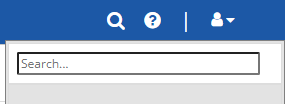
- In the Search field, enter one or more characters of a report name.
Tip: You may enter either the entire report name or a partial report name in the Search field. The search results display all reports that include your search criteria. For example, if you enter Deduction, the results include all reports that begin with or contain the word Deduction.
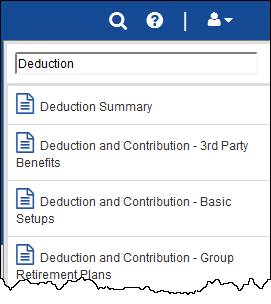
- In the search results, click the report you want to review.
Tasks
To run a report
- To open the report, use one of the methods described in the To access and open reports section.
Note: If you are running a standard report, depending on the report, one or more parameters are available to help you narrow your search results for specific information. For a list of all standard report parameters, see Standard Report Parameters.
- Select the pay group you want to view information for.
Based on your selection, additional options and fields may appear.
- If you plan to export the report data to Microsoft® Excel®, and you want data separated on separate tabs, in Excel Tabs select Yes. For example, the selected pay group uses more than one deduction code, if you select this option, information for each deduction code appears on an individual tab.
By default, No is selected.
- Select or enter information in all other fields as needed.
- Click View Report.
Tip: The View Report button is located on the far right side of the page. Depending on your monitor's resolution setting, you may need to scroll to display the button.
To export or save a report in a different format
Use this procedure to export or save a report to your computer in a different format, such as Excel or PDF.
Warning: If pop-up blockers are turned on, the export will fail. If this happens, turn off pop-up blockers. Then, open and export the report again.
- To open the report, use one of the methods described in the To access and open reports section.
- Enter and select information as needed and click View Report.
Tip: The View Report button is located on the far right side of the page. Depending on your monitor's resolution setting, you may need to scroll to display the button.
- When the report appears, at the top of the report, click Export.
- From the list that appears, select one of the following formats:
- Microsoft Excel (.xlsx)
- PDF (.pdf)
- Accessible PDF (.pdf)
- Comma Separated Values (.csv)
- Microsoft Powerpoint (.pptx)
- Microsoft Word (.docx)
- Web Archive (.mhtml)
- XML (.xml)
Note: Excel is the recommended format for exporting reports. If you export your reports in Excel format, you can manipulate the exported data as needed.
-
The browser you are using determines the next step in the procedure.
Next step for this procedure in common browsers If you use ... This occurs ... Google® Chrome® DaaS saves the report to the Download folder on your computer. Your browser settings determine if the report automatically opens or if you open the report from the Downloads folder. Microsoft® Edge® The report is saved to the Downloads folder on your computer, and appears in the Download list in the tool bar at the top of the page. If the download list doesn't automatically appear, click  .
.To open the image, click Open file.
Mozilla® Firefox® A window appears. Do this:
-
Click one of the following options:
- Open with to open the report before you save it to your computer.
Note: Click the drop-down arrow to select the program you want to use to open the report.
- Save File to save the report directly to your computer without opening it.
DaaS saves the report to the Downloads folder on your computer.
- If you want DaaS to use the same option (Open or Save) that you selected for this image on all other reports you export, select Do this automatically for files like this from now on.
- Click OK.
-